LangQueue
A Chrome extension to streamline LLM workflows on ChatGPT, Gemini, and Claude by enabling storage, insertion, and queuing of multi-modal prompt chains.
1What does LangQueue do?
Reusing a prompt across ChatGPT, Gemini, and Claude usually means copying it into each chat. A sequence of prompts also requires waiting for each response before sending the next step.
LangQueue keeps prompts and prompt chains in a local Chrome extension library. Users can search that library from the chat composer, insert saved text and attachments, or run a sequence in the current conversation.
- Type
$in a supported chat to search saved prompts and chains. Select a prompt with Tab or a click, and edit its text from the in-page overlay. - Press Enter while a response is generating to queue a text prompt. The queue sends it after the model becomes idle.
- Build chains with text and attachments for each step. Execution waits for the response before advancing to the next step.
- Manage the library in the popup, and import or export prompts, chains, and optional attachment data.
2Technology stack and architecture
Application Development:
- React and TypeScript for the popup, with Tailwind CSS for its interface.
- Vite and the CRXJS plugin to build the Manifest V3 extension.
Runtime Parts:
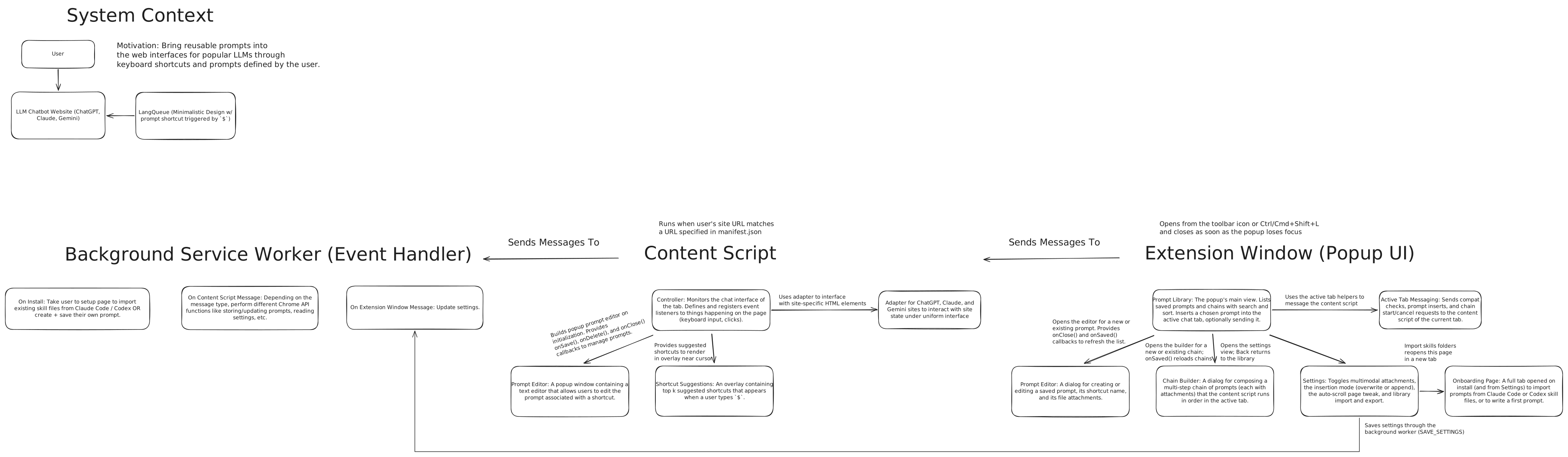
- A content script that runs inside each supported chat page, where it can interact with the document object model (DOM). It owns the overlay, queue, and chain execution.
- Site adapters that implement the DOM operations for each chat service.
- A background service worker that answers storage and search requests from the page.
- A popup that accesses the same local library through shared storage functions.
Storage:
- chrome.storage.local for prompt records, chains, and settings.
- IndexedDB, a browser database, for attachment bytes. The content script retrieves files through runtime messages in 64 KiB chunks before attaching them to the chat.
Architecture overview
© 2026 Jerry Chen